How to Redeem SAB RNG Codes
Exact UI steps, troubleshooting, and where to hear about new codes first.
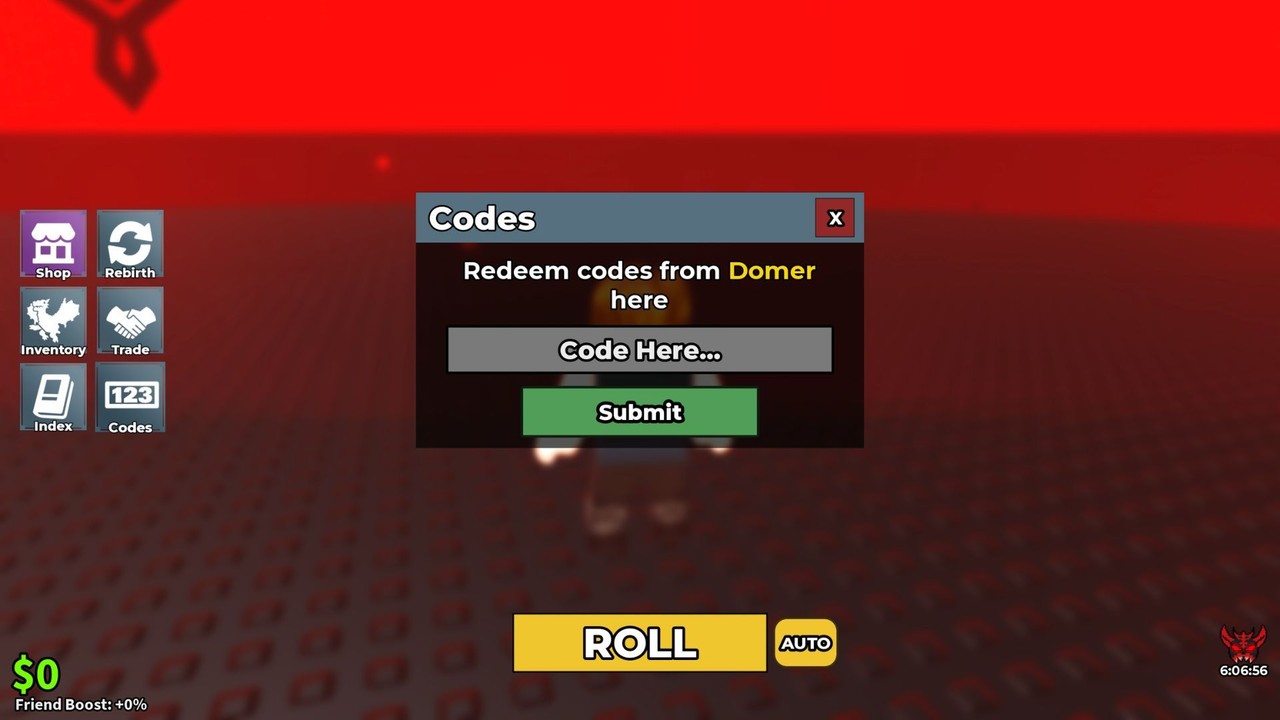
Redeem codes in SAB RNG (step by step)
SAB RNG already ships a code redemption panel even while no active codes are listed on the Codes Hub. Learning the flow now means you can claim the first drop in seconds instead of searching menus while the server fills up.
Step-by-step
- Open Roblox and launch SAB RNG from the official place page (linked from our wiki links hub).
- Wait until your character loads into a server. Server size is small (eight players), so joins are usually quick.
- Look at the left side of the screen for the Code button—do not dig through settings first.
- Click Code to open the redeem field.
- Paste the code exactly as published. Prefer paste over typing to avoid case mistakes.
- Press Redeem and watch for a success toast, cash change, luck change, or inventory update.
- If the reward is cash or luck-related, decide immediately whether to bank it toward the next upgrade using luck upgrades and luck priority.
That is the entire happy path. Everything below covers failures, scams, and how to stay ready when November events or future patches ship strings.
What you should see after a good redeem
A successful redeem usually does one or more of the following:
- Adds cash you can spend in the luck shop
- Applies a luck boost or luck-related currency
- Grants a brainrot into inventory (confirm with the inventory habits in how to roll)
- Shows a clear success message
If nothing visible changes, leave and rejoin once, then check cash and inventory again before assuming the code failed. Soft UI desync happens in busy Roblox experiences.
Troubleshooting when codes fail
”Invalid” or rejected
- Confirm you are in SAB RNG, not classic Steal a Brainrot.
- Re-copy the string from a trusted list—ours on the Codes Hub when live, or an official Discord post.
- Check spacing: leading/trailing spaces break many Roblox code boxes.
- Respect case sensitivity;
Luckyandluckyare different strings.
”Already redeemed”
Most codes are one redeem per account. Alts need their own login if the rules allow multiple claims; do not share passwords to “help a friend redeem.”
Code button missing
- Wait for full UI load after spawn.
- Switch servers if the left-side controls never appear.
- Update the Roblox client on mobile or desktop.
- Make sure you are not in a broken private server instance.
Reward missing after success message
- Rejoin once.
- Check inventory and cash readouts carefully.
- Note whether the reward was a timed boost that already expired while you AFK’d.
Why redeem timing matters
SAB RNG’s economy is a flywheel: rolls produce cash, cash buys luck, luck improves rolls. A code that arrives during a dry streak can fund the next luck tier and flip your session. Players who redeem late still get the gift, but they miss the compounding window where early luck upgrades create better brainrots that pay for even more luck.
After redeeming, run a short focused farm using cash farming instead of impulsively rolling every last coin. Keep a cash buffer for the next listed upgrade on your luck planner checklist.
Where new codes are announced
Priority order:
- Official Discord — follow the Discord join guide (
adV4GUPPFB). - This wiki’s Codes Hub after we verify a string.
- In-experience or developer shout-outs during live events (see November 2026 updates).
Deprioritize random TikTok overlays, unpaid “code generators,” and Discord DMs from strangers. If someone asks you to log into a third-party site to “unlock” a SAB RNG code, stop immediately.
Account safety checklist
- Enable Roblox 2-step verification.
- Never paste your password into a “code checker” website.
- Do not download executors just because a video promises free codes—that is a different risk class covered on the Scripts Hub.
- Prefer official channels linked from Official Links.
Practice run while codes are empty
Even with zero active codes in November 2026, do a dry run:
- Join SAB RNG.
- Find the left-side Code button.
- Open it so you memorize the panel.
- Close it and continue your getting started loop.
Muscle memory beats panic when a limited code drops during a comeback event. Limited or milestone codes sometimes expire quickly or hit global claim caps in other Roblox games; being ready is free.
After you redeem: convert value
Use this micro-plan:
- Identify reward type (cash, luck, brainrot).
- If cash — compare against the next luck purchase on luck priority.
- If luck — resume rolling with intent using how to roll.
- If brainrot — decide keep vs reroll mindset with the brainrots tier list.
- Log out of FOMO; return to the steady roll → cash → luck loop.
Related pages
- Codes Hub — live working / empty status
- Getting Started
- Players Discord Guide
- Updates Hub
When the first verified SAB RNG code appears, redeem with this guide, then spend the gift on purpose—not on panic rolls.
Frequently Asked Questions
Quick answers to the most common questions.
Where is the Code button in SAB RNG?
On the left side of the screen after you load into a server. Open it, paste the code, and press Redeem.
Why does my code say invalid?
You may be in the wrong game, have a typo or extra space, or the code expired. Copy again from a trusted list and confirm you are in SAB RNG.
Can I redeem the same code twice?
Usually no—most Roblox experience codes are once per account. An already-redeemed message means you are done on that account.
Are there codes to redeem right now?
Not as of November 2026. Keep the Codes Hub bookmarked and watch Discord for the first drop.
What should I spend code rewards on?
Prioritize luck-related rewards or convert cash into the next luck upgrade before burning everything on low-value rolls.